
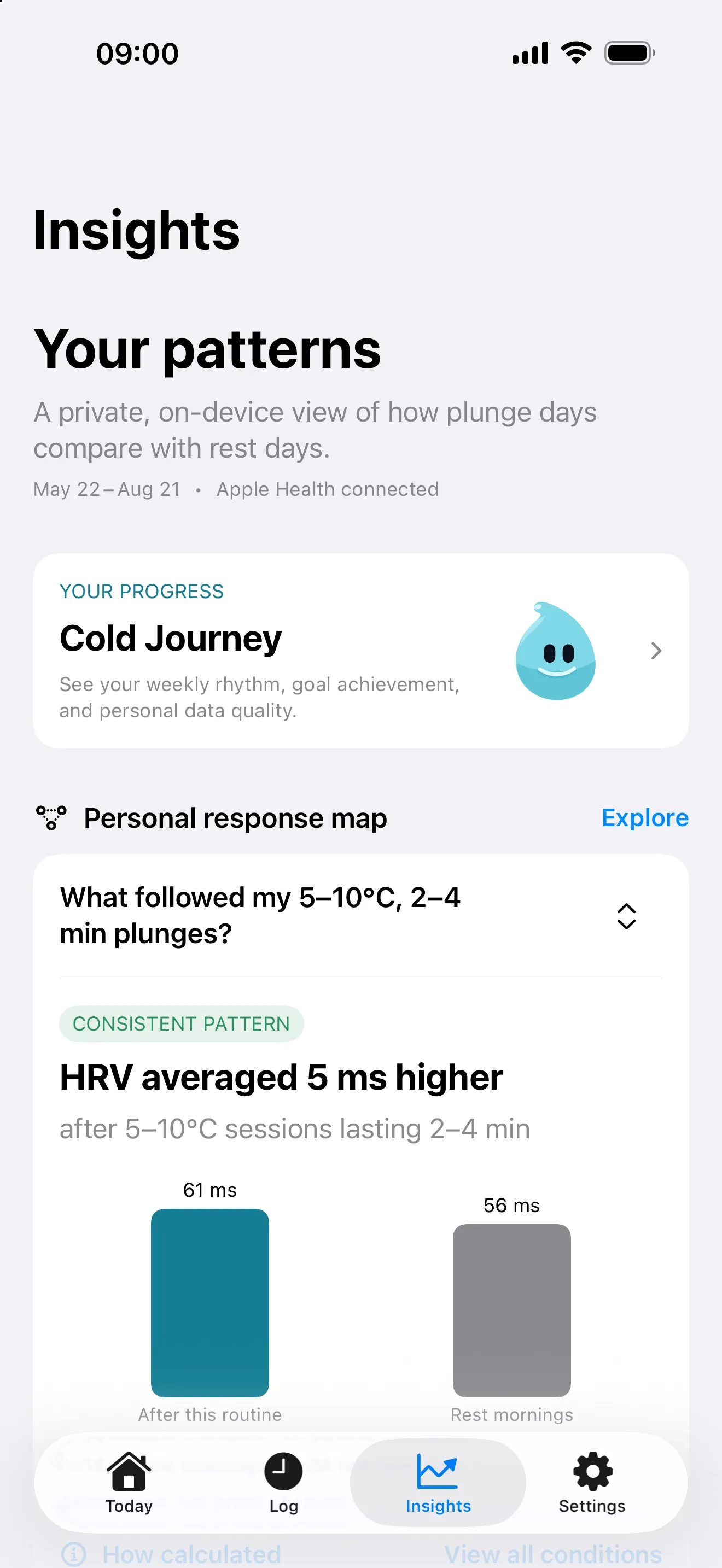
What are cold plunge insights in PlungeLab?
PlungeLab Pro compares observations in your session history with available Apple Health data. It can describe differences in measurements such as heart-rate variability, resting heart rate, and sleep across plunge days and rest days. These are personal associations—not proof that cold exposure caused an outcome.
The comparisons are based on your own observations, not a population leaderboard. Their usefulness depends on the history and Health measurements available on your device.
What does the HRV comparison mean?
The HRV comparison uses available Apple Health heart-rate variability measurements recorded as SDNN. PlungeLab compares the observed measurements associated with plunge days and rest days and reports the sample context with the difference.
A positive or negative difference is not a diagnosis, recovery clearance, or instruction to change exposure. Sleep schedule, exercise, illness, medication, alcohol, and other factors can influence the observations. Even a pattern that repeats does not establish causation.
See how your weekly cold minutes line up with your own HRV
PlungeLab groups weeks by how much of your selected weekly goal you logged: below 50%, 50–100%, or over 100%. For each group with at least three usable weeks, it shows mean HRV in the following week and the number of weeks. A group without enough data is omitted; if none qualify, the app shows that more weeks are needed.
These are observations from your history, not recommended temperatures, durations, or exposure targets. They do not establish that changing your weekly cold minutes would change your HRV.
How much data does a comparison need?
The plunge-day comparison needs at least eight usable plunge days and eight usable rest days in the analysis window. A logged session alone doesn’t guarantee a usable Health observation for every metric. Different measurements can therefore have different sample counts or remain unavailable.
The default window is the trailing 90 days. Plunge-day outcomes are aligned to the following wake-up, and the analysis can exclude outlier observations. This is why a comparison’s counts may not equal the total number of sessions in your log.
A free trial provides access to Pro features; it doesn’t promise enough data or a visible pattern before the trial ends. Extra plunges are not a troubleshooting step.
Do I have to connect Apple Health?
No. You can use the session log without Apple Health. Permissions are optional and granular, so you decide which supported data types the app can access. Revoking access can limit related comparisons without preventing local manual logging.
Apple doesn’t always tell an app whether read access was denied. Missing measurements may reflect permissions or simply an absence of readings. The support page explains where to review access.
Is my health history uploaded for analysis?
Session history and Apple Health analysis stay on your devices during ordinary app use. PlungeLab doesn’t require an account. RevenueCat processes limited purchase and technical information for Pro access, not your session history, health measurements, notes, or insight results.
Website requests and messages you choose to send to support are separate. The full privacy policy explains those cases, local deletion, Apple Health controls, and purchase-record handling.
What is free, and what needs Pro?
Core capture and history are free. Pro adds personal comparisons and additional analysis tools through optional purchases. Current prices, available plans, and any trial eligibility are shown by Apple and the app’s purchase sheet. Read the purchase terms before subscribing.
You don’t need an insight to make the log useful. Record a cold shower, an ice bath, or another supported session and keep the details you want to remember. PlungeLab is a fitness and journaling tool, not a medical device or exposure prescription.
Your data, your patterns — correlation, not medical advice.

Questions before downloading? Talk to the team.