
For iPhone users who want free Apple Watch capture, local session history, and optional Apple Health comparisons, PlungeLab is our pick. We built it for that workflow. Plunge suits its equipment owners, GoPolar offers community and Garmin support, and Shiver is a free phone timer. For sensor temperature, check both the Watch model and app.
Start with a useful record today. Record from your Watch or log manually on iPhone, then keep your sessions together without creating a PlungeLab account. Download PlungeLab free. Pro is optional; you can use capture and history without starting a trial.
This guide compares nine distinct apps, including our own. Prices, ratings, and feature statements below were checked against US App Store pages and developer sources on October 21, 2026. We have not installed and tested the competing apps for this article. A stated feature is a developer claim, not a result from our own device testing.
Quick picks: which cold plunge app fits your routine?
Start with the job you need done. An iPhone timer, a Watch recording, and a multi-round contrast routine are different workflows. The order below is not a ranking. Free download also does not necessarily mean an ongoing free tier: Ultra Plunge describes a trial followed by paid access.
Scroll to read the full comparison →
| App and primary source | Good fit for | Free access / US price | Apple Watch app | US rating shown |
|---|---|---|---|---|
| PlungeLab — our app | Free Watch capture, local history, optional personal Health comparisons | Free capture/history; $4.99/month, $24.99/year, $59.99 lifetime | Yes | Not enough ratings for a summary |
| GoPolar | Community, challenges, Garmin | Free download; $6.99/month or $39.99/year | Yes | 4.7 / 310 ratings |
| Plunge — Official App | Plunge equipment owners | Free; no in-app purchases listed | Yes | 4.7 / 1.8K ratings, rounded by Apple |
| TrackCold | Saved multi-round routines | Free tier; $4.99/month, $34.99/year, $149.99 lifetime | Yes | Not enough ratings for a summary |
| Hormetic | A one-time purchase and count-up timer | $2.99 once; developer states no subscription | Yes | 5.0 / 2 ratings |
| Ultra Plunge, RPA Tech | Custom routines, Strava, guided breathing | 7-day trial; $5.99/month, $39.99/year, $59.99 lifetime | Yes | 4.2 / 51 ratings |
| IceBuddy | Cold-session tracking and Strava | Free download; Premium purchases $6.99, $39.99, $59.99; periods not stated | Yes | 4.6 / 31 ratings |
| Brisk | An iPhone log with challenges and a location map | Free download; $4.99/month or $39.99/year | No Watch app listed | 4.7 / 63 ratings |
| Shiver: Cold Plunge Log | A free iPhone timer and history | Free; no in-app purchases listed | No Watch app listed | 4.8 / 70 ratings |
These are displayed US prices, not quotes for every country or customer. Trial eligibility and available offers are confirmed in Apple’s purchase sheet. Ratings describe the displayed storefront snapshot, not our assessment of quality; two ratings and hundreds of ratings provide very different amounts of feedback.
How we compared the apps
We checked each app’s description, compatibility section, in-app purchase list, privacy label, and relevant release notes. Developer websites and privacy policies add detail where the listing is incomplete. We distinguish automatic measurement from a temperature someone enters manually; a field named “temperature” does not establish sensor support.
“Not stated” means the sources we checked did not establish the feature. It does not mean the feature is absent. Account requirements are similarly narrow: “no app account” does not remove an Apple Account requirement for purchases or iCloud. A privacy label is supplied by the developer, and Apple says it has not verified those disclosures.
We also checked our Watch capture, manual log, cold shower, and Insights claims against PlungeLab’s source audit. That supports an implementation claim, not a claim that every supported Watch model was physically tested.
Watch temperature, Garmin, and account requirements
Apple documents underwater temperature support on Apple Watch Series 10 and later, excluding SE, and Ultra models. The app must also implement the capability. Hormetic is an example of why the distinction matters: its own documentation currently limits automatic temperature capture to Ultra even though newer Series hardware has the sensor.
Scroll to read hardware and account details →
| App | Temperature from Watch sensor | Garmin | Separate app account |
|---|---|---|---|
| PlungeLab — our app | Series 10+ and Ultra when capability/readings are available; source-verified, not bench-tested on every model | No integration in current source | No app account |
| GoPolar | Release notes mention sensor/detection improvements; models not specified | Published Connect IQ app | Account sign-in described; guest access not established |
| Plunge | Watch release notes say “log water temp”; automatic versus manual not specified | Not stated | Profiles described; guest access not established |
| TrackCold | Watch page describes entered water temperature; automatic capture not established | Privacy policy describes optional Garmin sync; availability not independently confirmed | No app account, per developer |
| Hormetic | Ultra automatic; other models use entered temperature | Not stated | No app account, per developer |
| Ultra Plunge | Ultra and Series 10+, per listing | Not stated | Not established; privacy sources need clarification |
| IceBuddy | Water-temperature logging stated; sensor/model support not specified | Not stated | Not stated |
| Brisk | No Watch app listed | Not stated | Not stated |
| Shiver | No Watch app listed | Not stated | No signup, per listing |
PlungeLab’s current public listing still describes Ultra-only sensing. Our source review found capability-based support for Series 10 and later as well; the wording above distinguishes that review from installed-binary testing. Cold-shower temperature remains best effort and can require manual entry. Showers do not use automatic water-entry or exit handling.
The apps: strengths, limits, and prices
PlungeLab — our pick for free capture and private personal insights
We built PlungeLab to make your existing cold routine easier to record and understand. Start a plunge, shower, or open-water recording on Apple Watch, then review your history on iPhone. Prefer to leave the Watch behind? Add a session manually, including sauna and contrast sessions. Capture and history are free, with no PlungeLab account required.
The immediate value is a record you can return to: duration, known temperature, notes, mood, and available post-session heart-rate recovery. Widgets and complications keep weekly progress close by. Series 10+ and Ultra support sensor temperature when readings are available; manual entry remains useful when they are missing.
When you want to explore your history further, Pro adds personal Apple Health comparisons and CSV export. Session and Health analysis stay on your devices during ordinary use; Apple and RevenueCat process limited purchase information. Comparisons are observational and need enough data. A seven-day trial does not guarantee a personal result.
Choose PlungeLab if you want a free recording habit now and optional personal insights as your history grows. It requires iOS 26+, is English-only, and has no Garmin, community, or guided breathing. US Pro prices are $4.99/month, $24.99/year, or $59.99 lifetime, with a seven-day trial for eligible yearly subscribers.
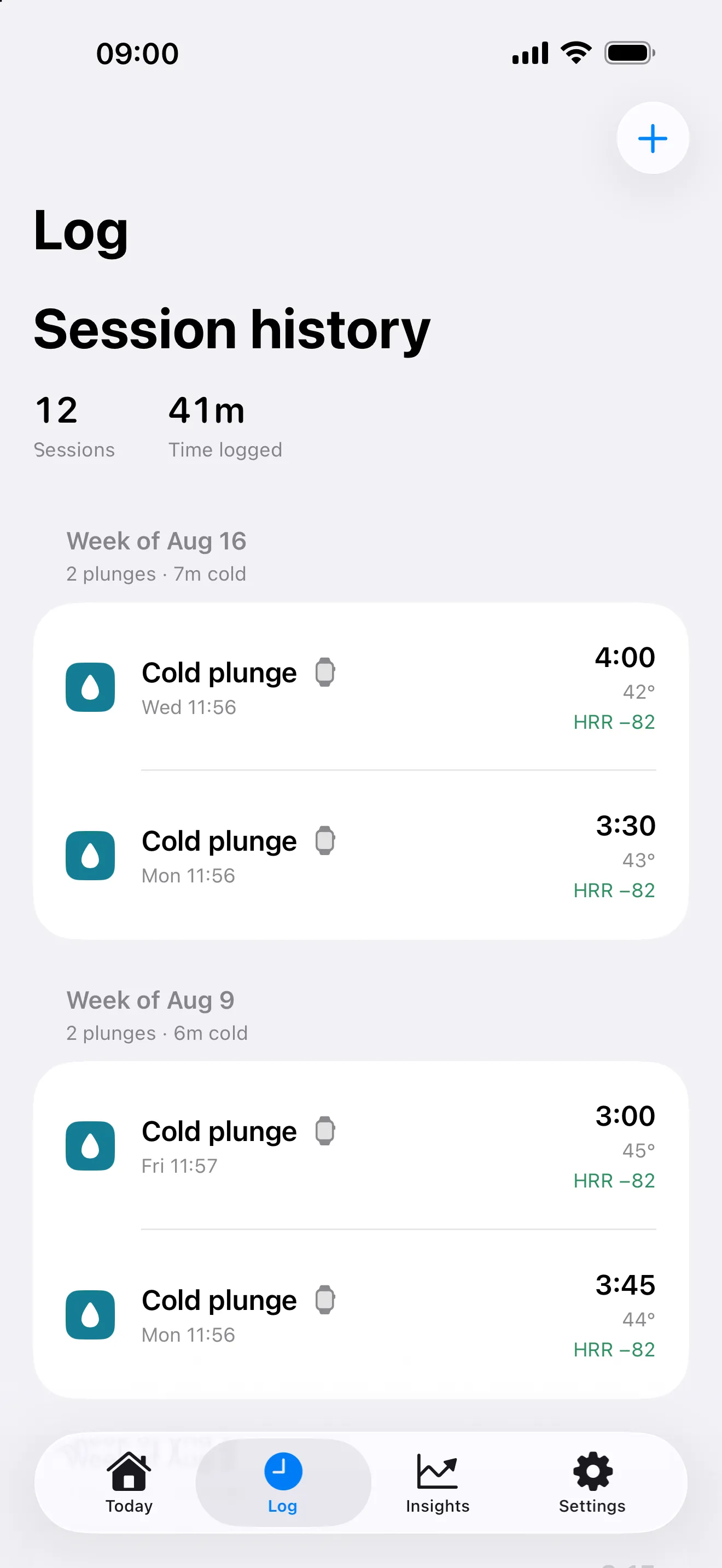
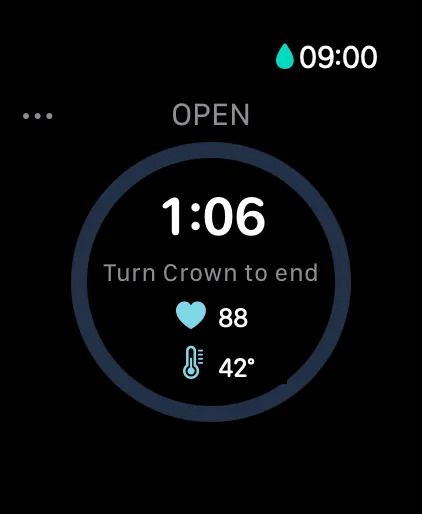
Start tracking free with PlungeLab, or see how personal Insights works before choosing Pro. Product details and listing checked October 21.
GoPolar — community and Garmin
GoPolar is worth considering when sharing activity and participating in challenges are part of what you want from a tracker. Its listing covers cold plunges, showers, sauna, red light, and hyperbaric sessions. Apple Watch support is listed, and its developer links to a published Garmin Connect IQ app. These are broader platform and community options than PlungeLab currently offers.
The US listing shows $6.99 monthly and $39.99 annually. It does not clearly itemize every free-tier limit or name the Watch models used for sensor temperature. Release notes describe both account sign-in and temperature-detection changes. Its privacy label includes identity-linked Health & Fitness information, so read the policy if data handling is a deciding factor. Listing and release notes, checked October 21; Garmin announcement.
Plunge — Official App — equipment and session tracking
Plunge’s official app combines a session timer and history with functions for the company’s equipment, including controls and maintenance information. It is a natural first app to check if you already own compatible Plunge products. The US listing is free and shows no in-app purchases, giving it a different price model from subscription trackers.
Its Watch release notes describe a standalone cold-plunge flow: start, pause, end, heart rate, temperature logging, and later phone sync. We could not establish from that wording whether “log water temp” means sensor capture or entry, so it is not marked as automatic measurement here. The description mentions user profiles; we have not verified guest access. Equipment-control compatibility and session tracking should be checked separately for your setup. Listing, compatibility, and release notes, checked October 21.
TrackCold — saved contrast routines
TrackCold emphasizes named routines, alternating cold and warm phases, a journal, and challenges. Its current listing gives the free tier three rounds per workout, five saved routines, Watch timing and heart rate, manual logging, and Apple Health workout writing. Asgard adds up to 20 rounds, more routines, Insights, and CSV export. It is a useful candidate when round structure matters more than a single timer.
The listed prices are $4.99/month, $34.99/year, or $149.99 lifetime. Its Watch page describes entered temperature. Its privacy policy says no account is required and describes private iCloud storage, but also discloses Firebase analytics, including workout type, duration, and round count. Optional Garmin sync appears in that policy; we have not confirmed its current store availability. Listing, checked October 21.
Hormetic — a one-time purchase and count-up timer
Hormetic is the lowest-priced one-time purchase in this set: the US listing shows $2.99, and its developer states there is no subscription or in-app purchase. It records Watch sessions to Apple Health and distinguishes measured temperature, entered temperature, and missing temperature. Its cold-plunge page describes a count-up timer without a suggested session length.
Its model-derived cold score is explicitly an estimate, not a measurement of benefit. Automatic submersion and water temperature are currently described for Ultra; other Watch models use manual temperature entry. Requirements are iOS 18.6 and watchOS 11.6 or later. The developer says no account or telemetry is used, and the listing carries a Data Not Collected label. Those are published disclosures, not our own network audit. Listing and cold-plunge guide, checked October 21.
Ultra Plunge — routines, breathing, and Strava
Ultra Plunge, from RPA Tech, appears under several names and URL slugs, including Ultra Cold Plunge & Sauna. They point to the same App Store ID, so we count one app. Its current description includes custom activities and routines, guided Watch breathing, Strava sharing, on-device AI features, and live water temperature on Ultra and Series 10 or later.
The live US purchase list shows $5.99 monthly, $39.99 annually, and $59.99 lifetime. The description advertises a seven-day trial and says paid access is required afterward. It says history is stored in iCloud and AI runs locally, while the linked privacy page discusses broader collection. We would seek clarification before calling it account-free or making a blanket no-collection claim. Listing, checked October 21; linked privacy page.
IceBuddy — cold-session tracking and Strava
IceBuddy focuses on cold-session recording, with a timer, manual entry, Watch capture, Apple Health synchronization, and Strava sharing in its description. It also describes a weekly rhythm and streak system. This makes it a candidate for someone who wants their cold sessions alongside activities they already share to Strava, without necessarily needing a broader multi-activity routine builder.
The US in-app purchase list displays three products called IceBuddy Premium, priced $6.99, $39.99, and $59.99. Their billing periods are not labeled there; we have not converted those figures into assumed monthly, yearly, or lifetime offers. Water temperature is mentioned, but the listing does not clearly identify its source or supported sensor models. Account requirements and permanent free-tier limits also remain unconfirmed. Listing and compatibility, checked October 21.
Brisk — iPhone logging and challenges
Brisk combines cold-session tracking with challenges, a health dashboard, and a map of places to plunge. Its description says it works with different tubs rather than being tied to a hardware brand. If you record from an iPhone and want those discovery and habit features, it belongs on your shortlist. Its iOS 15 minimum also accommodates older software than PlungeLab’s iOS 26 requirement.
The compatibility section lists no Apple Watch app, so we would not choose it for wrist capture on the evidence available. US Premium prices are $4.99 monthly or $39.99 annually; the full ongoing free allowance is not specified. Its privacy label includes tracking-related usage data and identity-linked categories. Review those disclosures rather than assuming a health dashboard means everything remains local. Listing, compatibility, and privacy label, checked October 21.
Shiver: Cold Plunge Log — a free iPhone option
Shiver: Cold Plunge Log, by Skipping Rock Solutions, is the app meant here—not the separate Shiver cold-shower app. Its listing describes an iPhone session timer, calendar-style activity chart, history feed, and statistics for recorded sessions. It says no signup or credit card is needed. The US listing is free with no in-app purchases shown, making it a sensible place to start for a simple phone-based log.
There is no Watch app in the compatibility section, and no established automatic sensor-temperature workflow. The description says session history is stored locally and the app works offline. Its privacy label separately lists non-linked user content, usage data, and diagnostics; local session storage should not be read as a promise that no other data is collected. Listing, checked October 21.
Privacy: no account and no data collection are different promises
An app can avoid signup while still sending purchase information, usage events, or crash reports. TrackCold’s policy is a concrete example: private history and no app account coexist with disclosed analytics. Shiver’s local-history description also sits alongside a broader privacy label. Those distinctions matter more than a single “private” checkbox.
For PlungeLab, session and Health analysis stay on devices during ordinary use, while Apple and RevenueCat handle limited purchase-related information. Read our privacy policy for the scope. For competitors, review their linked policy and current App Store label together; ask the developer when they disagree. We have not inspected network traffic or independently audited any competitor’s storage.
Which should you pick?
Our recommendation: start with PlungeLab if your priorities are free Watch recording, local history, and optional personal Health comparisons. You can find out whether the capture flow fits your routine before paying for Pro. Download it free, or follow our Apple Watch setup guide.
- You own Plunge equipment: start with its free official app and confirm your hardware’s controls.
- You want community or a published Garmin app: consider GoPolar; check your exact Garmin model. TrackCold’s policy describes Garmin sync too, but availability needs confirmation.
- You want saved multi-round routines: compare TrackCold’s free allowance with Ultra Plunge’s paid workflow.
- You want sensor temperature: confirm both the Watch model and the app’s implementation. Hormetic’s published Ultra-only implementation differs from Ultra Plunge’s Series 10+ claim.
- You want an inexpensive purchase without a subscription: look at Hormetic’s $2.99 one-time price.
- You want a free iPhone log: PlungeLab’s manual history works without a Watch; Shiver also offers a free log and supports older iOS versions.
- You want personal Health comparisons: explore PlungeLab Pro’s Insights, including what it compares and how much history it needs. Choose it for observations about your own records, with the limits explained alongside the result.
Do you need a cold plunge app at all?
A stopwatch and a note can be enough if you only want duration and a short history. A spreadsheet adds sorting and export without requiring a specialist tracker. Choose an app when wrist operation, saved rounds, automatic recording, or reviewing sessions together solves a real inconvenience for you.
Apple’s published Workout list does not include a dedicated cold-plunge type and points to Other when no type matches. That is different from a third-party app saving a workout with a custom cold-plunge title in Fitness. A specialist app can organize temperature, notes, and session types beyond that generic entry. It cannot establish whether a session is safe or prove that a recorded routine caused a health change.
Frequently asked questions
What is the best free cold plunge app with no subscription?
PlungeLab’s capture and history are free without a subscription, including manual logging when you do not have a Watch. Pro is optional. Shiver: Cold Plunge Log and Plunge’s official app are free with no in-app purchases listed; TrackCold also has an ongoing free tier. Hormetic costs $2.99 upfront.
Can Apple Watch measure ice-bath water temperature?
Series 10 and later, excluding SE, and Ultra models support underwater temperature measurement according to Apple. The app must read that sensor, and it needs actual readings. A manual-temperature field or ordinary wrist-temperature feature is not evidence of automatic water-temperature capture.
Which cold plunge apps work with Garmin?
GoPolar has a published Connect IQ listing and a developer setup announcement. TrackCold’s October privacy policy describes optional Garmin companion sync, but we did not confirm a public listing or supported-device roster. Check compatibility before choosing or paying.
Can I track cold showers with these apps?
Several list showers, including GoPolar, TrackCold, and PlungeLab. Recording shower duration is separate from measuring running water: in PlungeLab, showers start and end manually, and sensor temperature may be unavailable. See our cold-shower explanation.
Does a tracker show whether cold plunges improved my HRV?
Some apps display Health data or personal comparisons. Such observations do not establish that cold exposure caused a difference, and missing data or small samples can prevent a useful comparison. Read what is compared and how much history is needed before paying for that feature.
Can I use my Watch to track sauna sessions too?
A sauna feature does not establish that your Watch is suitable for sauna heat. Check Apple’s water-resistance and sauna restrictions for your model. PlungeLab’s sauna entries are manual on iPhone; leave the Watch outside the sauna and record afterward.

Free session capture and history for iPhone and Apple Watch. Talk to the team.