
It depends on your model, its condition, and the conditions of use. Water resistance alone does not establish ice-bath suitability. Check Apple’s model-specific temperature guidance, use a water-appropriate band, and expect possible heart-rate gaps. Apple does not specifically endorse ice baths in the guidance cited here or guarantee against damage.
This guide separates three questions: whether your Watch is suitable for water, how cold conditions affect its operation, and what a tracking app can record. None establishes that immersion is appropriate for you. Your Watch and PlungeLab are not safety devices for a cold plunge; read the beginner guide’s safety section before planning one.
The short answer, by Apple Watch model
Use the exact model rather than assuming every Apple Watch has the same limits. The table labels ambient temperature separately from water temperature.
Scroll to read the full table →
| Model | Water guidance | Temperature guidance |
|---|---|---|
| Apple Watch first generation / Series 1 | Apple advises against submersion. Source | Do not infer immersion suitability from a temperature specification. |
| Series 2 and later | 50 m water-resistance rating; shallow-water use. Source | Series models work best at 0–35°C ambient. Source |
| Apple Watch SE | 50 m water-resistance rating; check your generation’s specifications. SE specifications | SE models work best at 0–35°C ambient. Source |
| Apple Watch Ultra models | 100 m water-resistance rating. Source | 0–40°C water for underwater activities; −20–55°C ambient while worn. Source |
The Series/SE ambient range is not a verified ice-bath water range. Ultra’s separate underwater specification is clearer, but does not guarantee your particular Watch against damage. These numbers describe equipment conditions, not recommended exposure temperatures. Wearing it remains at your own risk.
Water suitability also differs from app compatibility: an older Watch can have a water-resistance rating without supporting PlungeLab. Our Watch capture page explains the app’s current iPhone and watchOS requirements.
Water resistance, temperature, and wear all matter
Apple’s water guidance says resistance can decline over time. Choose a band suitable for water; leather, Milanese Loop, and Link Bracelet are among Apple’s unsuitable examples. Avoid soap, lotions, sunscreen, and high-velocity water. A familiar tub does not remove the need to check the Watch and band.
Do not use somebody else’s successful plunge as proof that your device will withstand the same conditions. Accounts of failures also cannot identify the cause without an assessment. Model documentation is a better starting point than anecdotes about how long a stranger kept a wrist underwater.
Why heart rate can disappear in cold water
Apple Watch’s optical sensor uses light to measure changes in blood flow at the wrist. Apple explains the sensing method. A working timer and an incomplete heart-rate trace can therefore coexist: elapsed time does not depend on a continuous optical reading.
Apple’s measurement guidance identifies reduced skin perfusion in cold conditions as one reason the sensor may get no reading. Fit, motion, and tattoos can also affect results. Wear the Watch snugly on top of the wrist without making the band uncomfortably tight; better contact cannot guarantee uninterrupted data.
For a saved session, keep the distinction between missing, zero, and measured. A gap is not evidence that heart rate was steady or that the session was safe. Do not extend an exposure to obtain a more complete graph, or treat a displayed number as permission to continue. Recording is secondary to leaving the water whenever you need to.
Battery and touchscreen limitations
According to Apple’s temperature guidance, cold can shorten battery runtime, and very low or rapidly changing temperatures can affect touch response. The same guidance warns that operation outside recommended ranges can damage the device. An unexpected battery drop is not a reliable thermometer.
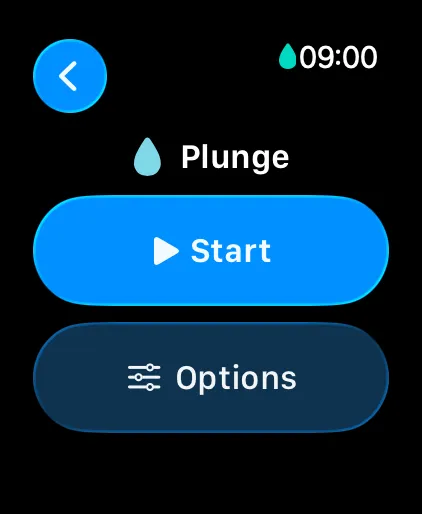
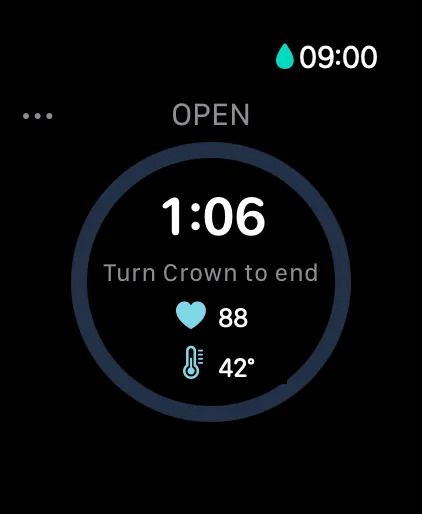
Set up your recording and understand the physical controls before approaching the water. In PlungeLab, manual Start leads to a haptic countdown, then capture begins. An open-ended recording ends with a deliberate Crown rotation. Practice the sequence while dry rather than depending on a wet display to discover how it works.
Water Lock: what to turn on and how to unlock
Water Lock blocks touchscreen input to prevent accidental taps. It does not increase the Watch’s water resistance. Apple’s current instructions, checked October 21, 2026, are:
- Press the side button to open Control Center.
- Tap Water Lock.
- Once out of the water, press and hold the Digital Crown until the display says Unlocked. Tones help eject water from the speaker.
Apple documents a different unlock gesture for watchOS 8 and earlier. PlungeLab requires watchOS 11 or later, so its walkthrough uses the press-and-hold method.
For cold plunge and open-water capture, PlungeLab enables Water Lock during recording. Keep the two Crown actions separate: rotate to finish the PlungeLab session; press and hold to unlock Water Lock. Ending the recording saves locally without a separate wet-screen Save tap. The complete Watch walkthrough covers the confirmation and transfer to iPhone.
After the plunge: rinse, dry, and consider the sauna separately
Apple’s aftercare instructions call for a gentle rinse with lightly running, warm fresh water after swimming, then thorough drying with a nonabrasive, lint-free cloth. This is relevant after salt or chlorinated water. Avoid heat, compressed air, and sprays for drying.
The same guidance says to avoid steam rooms, saunas for non-Ultra models, and saunas above 55°C for Ultra models. An Ultra underwater temperature specification is not a sauna specification. For PlungeLab sauna or contrast logging, leave the Watch outside and use manual iPhone entries. A recording workflow should never require carrying equipment into conditions it is not intended for.
Track your cold plunges with PlungeLab
Once you’ve checked your Watch’s suitability, PlungeLab gives you a way to keep the session beyond a timer on your wrist. Our Apple Watch cold plunge tracker brings wrist capture and an iPhone session history together. Core session capture and history are free.
- Record from your wrist. Choose the session type, review Options, and tap Start. See elapsed time and available heart rate, then finish with a deliberate Crown rotation.
- Return to the details on iPhone. Review saved sessions and add notes or mood entries in your cold plunge log, so each record has context beyond its duration.
- Keep logging when the Watch stays outside. Enter a session manually on iPhone without needing a Watch or an Apple Health connection.
Every compatible Watch offers manual capture. Missing measurements stay unknown rather than being filled with guesses.
Apple documents underwater temperature support on Series 10 and later and Ultra models; SE lacks that capability. In PlungeLab, temperature still requires supported runtime capability, permission, and actual sensor samples. A manual temperature remains useful when known; clear it when unknown.
For the sensor model list and troubleshooting, read Apple Watch water temperature.
Automatic water-entry detection for cold plunge and open water additionally requires Auto-detect plunges enabled and the app’s monitoring path running. It is not continuous system-wide background detection. Cold showers use manual start and end. These compatibility statements were checked against our source and configuration, not a physical test of every model or the installed App Store binary.
Frequently asked questions
Will an ice bath damage my Apple Watch?
There is no blanket guarantee. Check the exact model, band, condition, and Apple’s operating guidance. Leaving the Watch outside and logging manually is an available alternative when you are unsure.
Does Water Lock make my Watch waterproof?
No. It controls touchscreen input and helps eject speaker water afterward. It does not seal the case or change its rating. A locked screen is not evidence that the device is suitable for the conditions.
Can I still save a plunge with missing heart rate?
Yes, PlungeLab can save a duration record with missing heart-rate measurements. Review the available data afterward; a saved record does not prove that every optional measurement was captured or that the exposure was safe.
Sources and editorial approach
Written by the PlungeLab team and checked October 21, 2026. Apple sources support hardware and operating guidance; PlungeLab’s source review supports the app workflow. This guide supplies no personal exposure protocol or medical clearance.
- Apple: water resistance, bands, aftercare, and sauna restrictions.
- Apple: model-specific operating temperatures.
- Apple: SE 3 specifications.
- Apple: optical heart-rate sensing.
- Apple: measurement accuracy, fit, and cold skin perfusion.
- Apple: Water Lock and water ejection.
- Apple: underwater temperature support.
Keep your next session in PlungeLab. Download PlungeLab free to record an already planned plunge from your wrist and review it on iPhone, or log manually when your Watch stays outside. Core capture and history are free; Pro is optional.
Back to top ↑