

A useful cold plunge journal records what happened and enough context to understand it later: session type, date and time, actual duration, known water temperature, how it felt, and a short note. Unknown measurements should stay unknown. The goal is a dependable record, not a collection of impressive numbers.
PlungeLab lets you keep that record for free on iPhone, with optional Apple Watch capture. This guide focuses on journal quality and interpretation; our Watch walkthrough explains the recording controls.
Start with the session facts
Keep the details you know separate from your interpretation. A duration is a recorded event. “This was better for my recovery” is a conclusion that needs more evidence.
Scroll to read the full table →
| Field | What to record | What to avoid |
|---|---|---|
| Kind | Cold plunge, cold shower, or open water, as appropriate. | Treating every activity as the same exposure. |
| Date and time | When the session actually began. | Dating a remembered session as if it happened today. |
| Duration | The actual recorded or known duration. | Replacing an early finish with the intended target. |
| Water temperature | A known reading, with the unit clear. | Guessing to fill an empty field. |
| Measurement context | A note about the source when useful. | Assuming a chiller setting equals a measured reading. |
These distinctions make a journal easier to revisit. A shower entry with no known temperature can be complete for what you actually observed. Filling every field is less useful than keeping the fields honest.
For the measurement side, our temperature and duration guide explains research conditions, units, and missing readings. A journal should describe your session rather than imply a prescribed exposure.
Record mood and intensity consistently
Subjective fields can preserve an experience that a timer cannot capture. In PlungeLab, mood before, mood after, and perceived intensity are optional ratings. Use them as personal descriptions, not diagnostic scores or proof that a session improved your health.
Decide what each rating means to you and keep that meaning reasonably consistent. If “mood after” sometimes means immediately afterward and sometimes means bedtime, you are answering different questions with the same field. Choose a repeatable occasion to make the note, when you are out of the water and settled.
Intensity is also personal. Two people may rate the same setting differently. Your rating is most useful alongside your own previous entries and the session context, rather than as a contest with another person’s score.
A positive, neutral, or disappointing entry all belong in the record. Keeping only the sessions that felt good makes the history harder to interpret.
What should a cold plunge note include?
Write enough to explain an unusual day without turning every entry into an essay. Useful context might include the activity before the session, a change of setting, a break in the recording, or how you felt afterward.
These are examples of concise notes:
- “Usual tub after an easy run. Felt more awake afterward.”
- “Different venue today; water temperature wasn’t measured.”
- “Recording included a break between dips.”
- “Busy workday. No noticeable change in mood afterward.”
The notes identify facts and experiences without assigning a cause. “Felt calmer afterward” says what you noticed. “The plunge fixed my stress” asserts much more than the record can establish.
If you revisit a session and add a detail later, make the uncertainty clear: “Added later: think this followed a run.” A remembered estimate should not silently become a precise measurement.
A simple journal example
Here is a fictional entry to show the structure. Its duration and ratings are illustrative, not exposure targets, customer data, or a recommended routine.
Scroll to read the full table →
| Field | Example entry |
|---|---|
| Kind | Cold plunge |
| Date and time | October 1, 7:20 a.m. |
| Actual duration | 2:40 |
| Water temperature | Not measured; left blank |
| Mood before / after | 3 / 4 on the personal rating scale |
| Perceived intensity | 3 on the personal rating scale |
| Note | Usual tub after an easy run. Felt more awake. |
What can you conclude? A session was recorded, temperature was unknown, and the person reported a different mood afterward. The entry does not establish that cold water caused the mood change or that the duration was appropriate.
The unknown temperature is useful information. It tells your future self where a comparison has a limit, rather than inviting confidence based on a made-up value.
Log a session in PlungeLab on iPhone
You do not need a Watch to build a history. In PlungeLab:
- Open Log and tap + to add a session.
- Choose the kind and check its start date and time.
- Enter the duration and a known temperature if available.
- Add optional mood, intensity, and a note.
- Tap Save, then check the entry in your history.
For Watch sessions, the transferred record provides the captured information. Open its detail on iPhone to add context. Automatically captured temperature and heart-rate information are distinct from the manual fields you can edit; retain that distinction when reviewing the record.
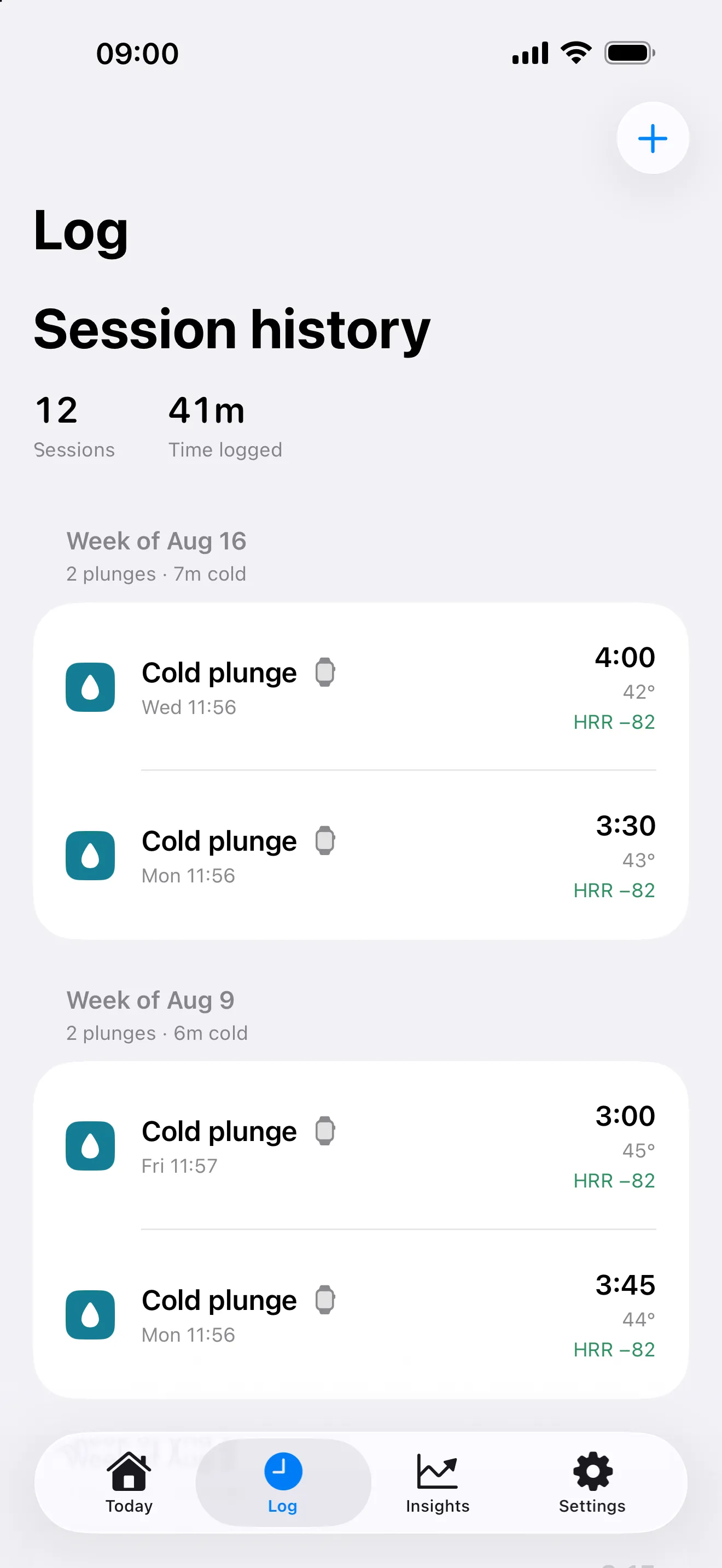
Manual entry, Watch capture, and session history are free. iPhone requires iOS 26+; the Watch app requires watchOS 11+. You can keep using the free log without activating a Pro trial.
Review patterns without turning them into conclusions
A journal can help you ask better questions. It cannot, by itself, isolate an effect of cold water. Cochrane’s guidance on observational studies describes problems involving confounding, measurement error, and retrospectively collected information. Applying those principles to a personal log is editorial guidance, not a validation study of PlungeLab.
Consider someone who plunges mostly on days with an easy workout and an early bedtime. If those days are followed by longer sleep, the plunge is only one possible explanation. Keeping a note about context helps preserve that ambiguity instead of hiding it.
When reviewing an existing history, ask:
- Are these the same activity and a comparable setting?
- Is temperature known, or am I comparing measured and unknown values?
- Did I record all the sessions, including ones that felt ordinary?
- Were training, bedtime, travel, or other parts of the routine changing?
- Are enough observations available to describe a pattern at all?
An unlogged plunge can make a day look like a non-plunge day in a comparison. Sensor gaps can also limit interpretation: Apple notes that cold conditions can affect optical heart-rate readings. Missing information should remain visible in your reasoning.
What does PlungeLab Pro add to a journal?
Optional Pro Insights use available Apple Health data to show personal comparisons, while CSV export lets you work with your session record outside the app. The plunge-versus-rest comparison requires at least eight usable days in each group. That is a data threshold, not a schedule to follow or a reason to add sessions.
The annual Pro plan offers a seven-day free trial for eligible customers, renewing into a paid annual subscription unless canceled. Apple’s purchase sheet gives the current price, eligibility, renewal date, and cancellation terms. A trial does not guarantee enough usable days for an Insight.
Your session history and health analysis stay on your devices during ordinary app use; choosing to share or export is a separate action. See PlungeLab’s privacy policy for the details.
Download PlungeLab to keep an accurate session history on iPhone or record from your Apple Watch. Start with the fields you know, add a short note when it helps, and let the history remain a record of your experience.
Frequently asked questions
Do I have to fill out every field?
No. Mood, intensity, notes, and temperature can be optional. A known duration and correct session context are more useful than completing every field with guesses.
Should I record an early finish?
Yes, as the actual session. Leaving when needed takes priority over an app target. The journal should preserve what happened rather than replace it with what was planned.
Can my journal prove that cold plunging works for me?
It can describe what you recorded and help identify associations worth examining. It cannot establish causation or assess personal safety. For the wider evidence, read our cold plunge benefits article.
Sources and editorial approach
Written by the PlungeLab team. The field checklist, notes, and fictional entry are our practical editorial examples. Methodological guidance and sensor limitations are linked to primary sources. This article has not been medically reviewed; no example is a customer outcome or exposure recommendation.
- Cochrane Handbook, Chapter 25: confounding and measurement bias.
- Apple Support: heart-rate measurement limitations.

Free session capture and history for iPhone and Apple Watch. Talk to the team.